Run your market. Free.
A public page Google can find, vendor applications, booth assignment, market-day check-in and announcements. For farmers markets, craft fairs, flea markets, food truck rallies and pop-ups. No seats. No tiers. No catch.
NO ACCOUNT NEEDED · SET UP IN A MINUTE · AN INTUZU PRODUCT
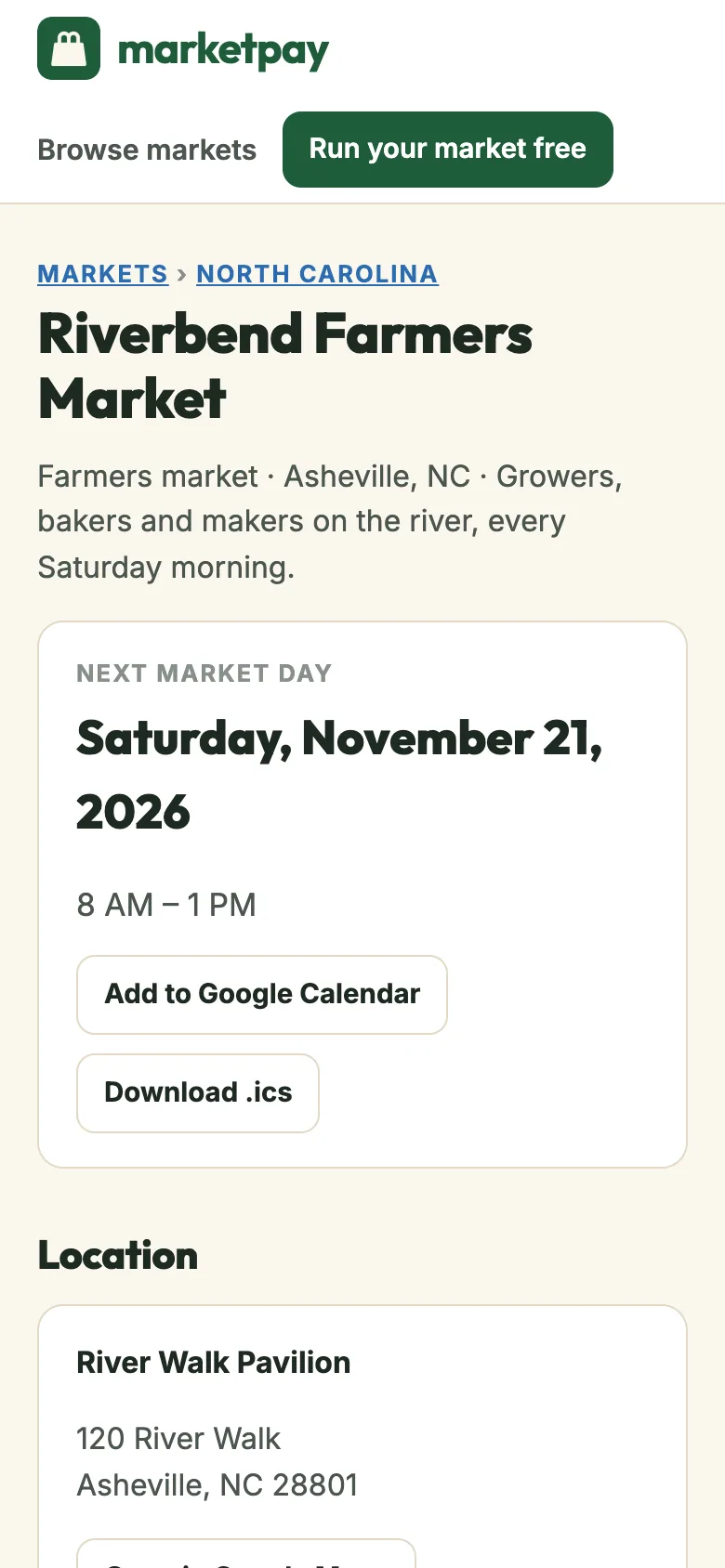
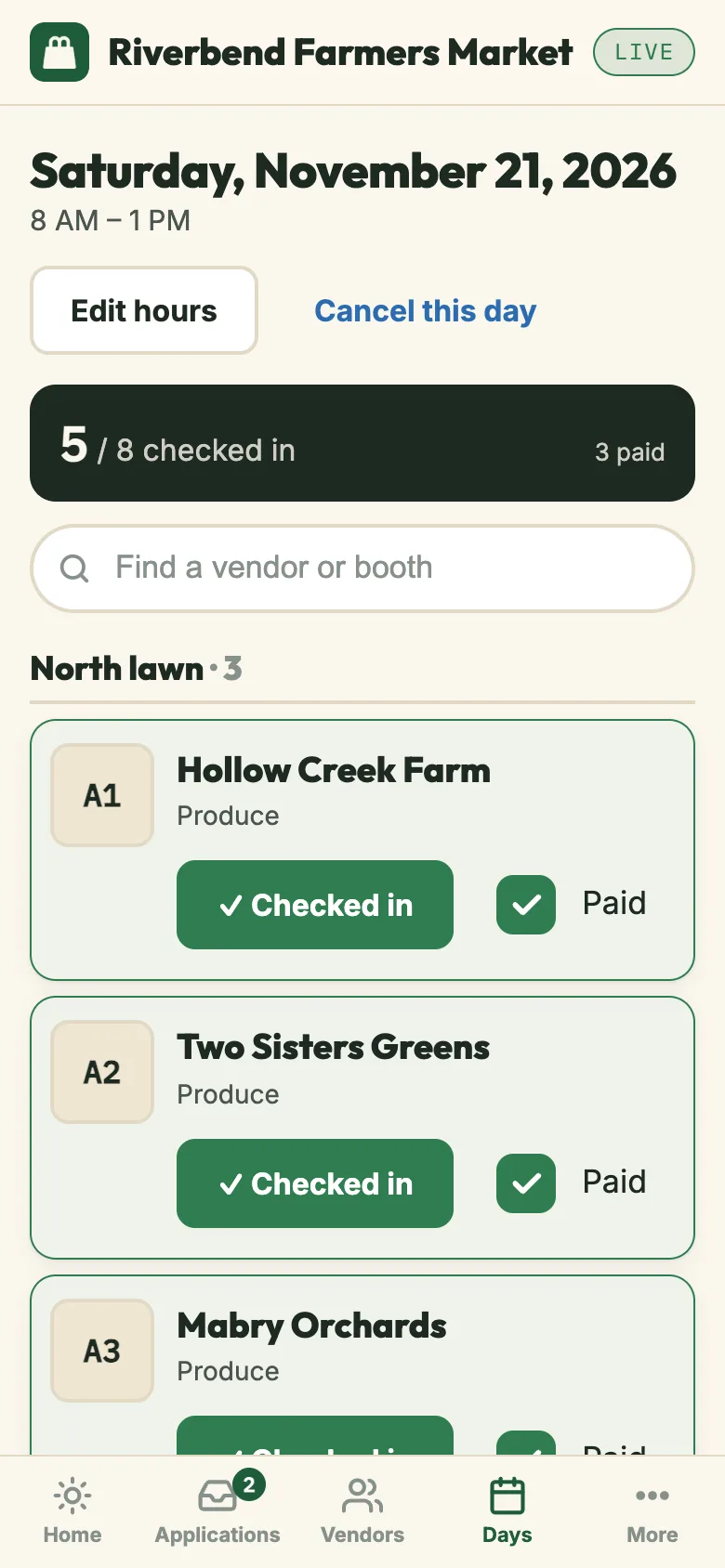
Real screens, sample market: the public page shoppers find, and the roster you run market morning from.
Most markets run on a spreadsheet, a Google Form, a Facebook group and a clipboard.
It works until the season fills up. Then the organizer becomes a switchboard, and the vendors and shoppers are the ones waiting on hold.
Applications come in by email, Facebook message, a Google Form and a phone call, and you copy each one into a spreadsheet.
Vendors apply from your market page. Every application lands in one queue, and approving one sends the email for you.
At 6 a.m. your phone fills with texts asking which spot is theirs.
The evening before, every vendor gets an email with the hours and their booth number.
Check-in is a clipboard. By nine you still are not sure who is a no-show or who has paid.
Today’s roster is on your phone, grouped by zone. Tap to check in, mark a no-show, tick paid. The count stays at the top.
A rain call goes out on Facebook, in a group text and by email, and someone still drives in.
Write one announcement. It is pinned on your page and emailed to every approved vendor.
Shoppers search for you and land on a Facebook post with last summer’s hours.
Your page shows up in Google with this week’s date, hours, a map and who is selling.
One market, three people who need something from it.
Every screen here is the real product, running a sample market called Riverbend.
Applications, booths and market morning, on your phone.
Review applicants with everything they sent in one card. On market day, the roster shows who is expected, who has arrived and who has paid. When the plan changes, one announcement reaches every vendor.
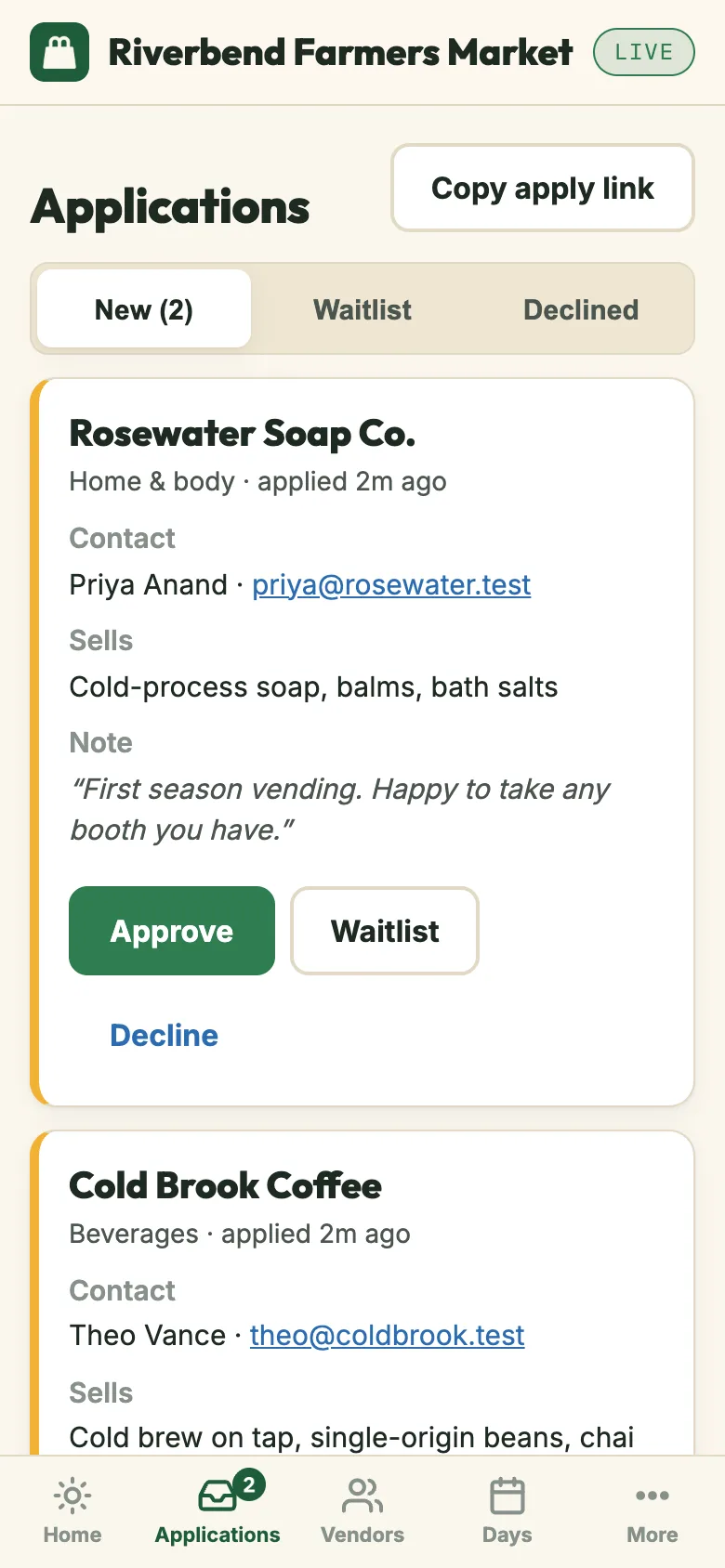
Applications. Approve, waitlist or decline. The vendor hears back by email.
Market-day roster. Check-ins, booth numbers and paid, with a running count.
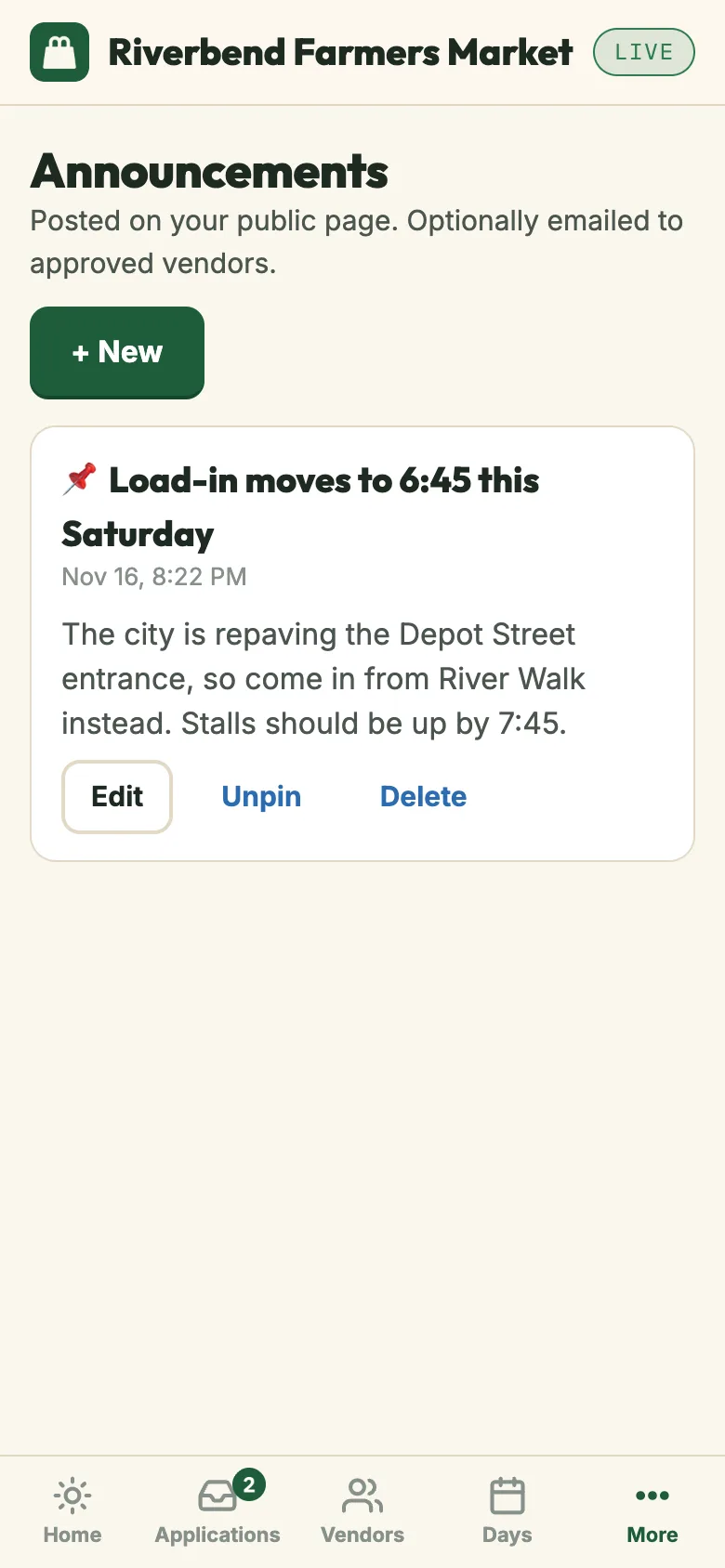
Announcements. Pinned to your page and emailed to approved vendors.
One link. No account, no app to download.
Vendors apply from your public page in a couple of minutes. Once approved, they get a private link with their booth and every upcoming market day, and they tap Confirm or Can’t make it. You know who is coming before you set up a single table.
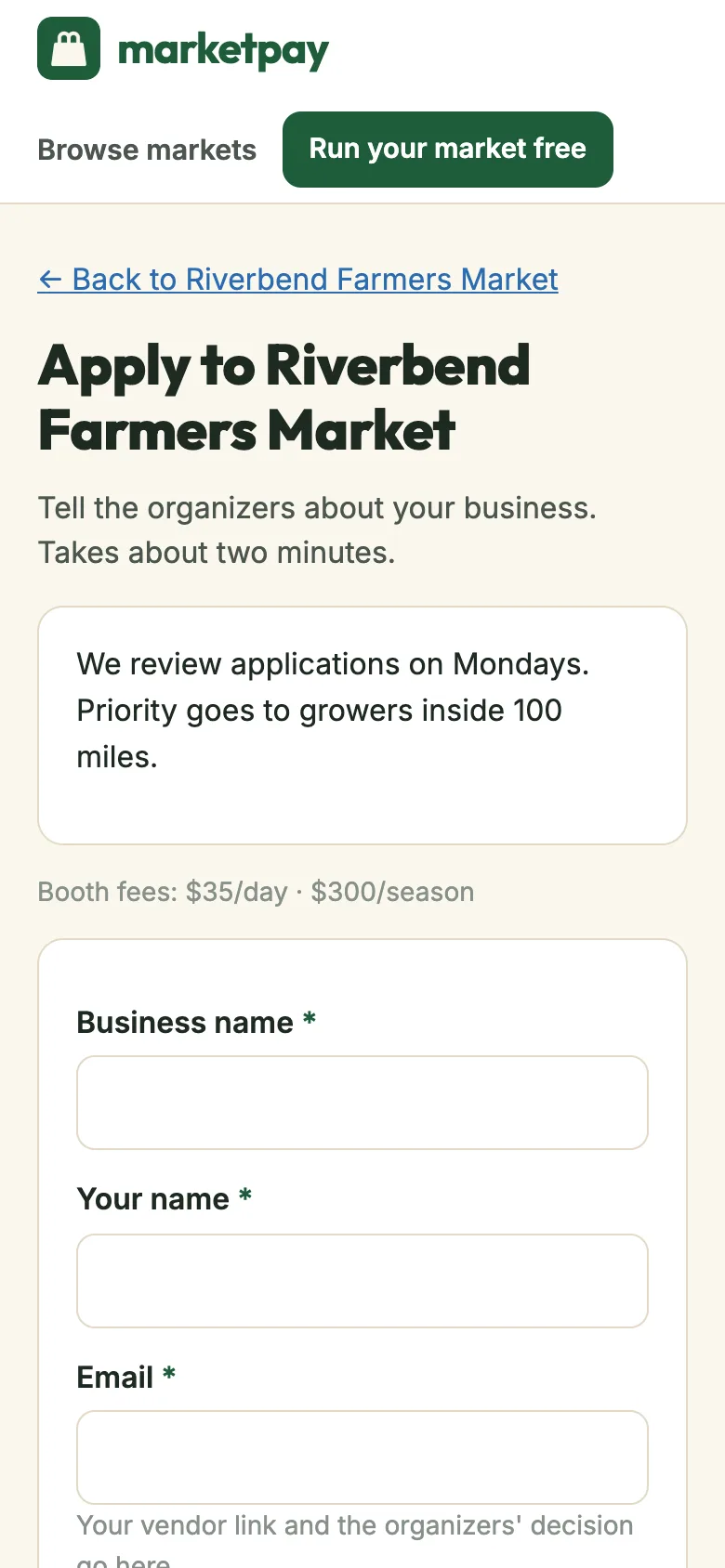
Apply form. Business name, category, what they sell and a note.
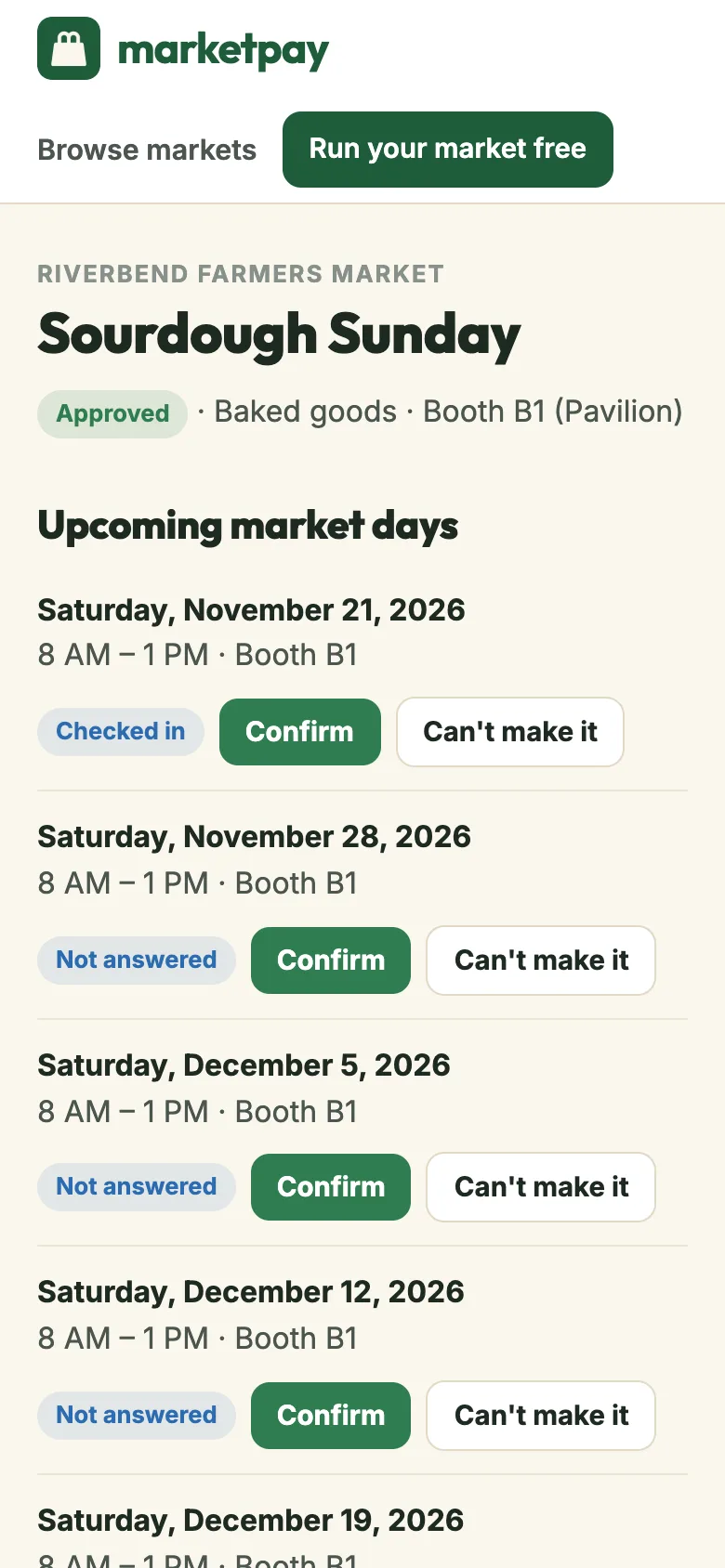
Vendor portal. Booth, dates and a Confirm button for each market day.
Is the market on this week, and who will be there?
Your page answers both. It has the next market day, hours, a map link, an add-to-calendar button and the vendor list by category. Every upcoming date is sent to Google as an event, and the page is listed in our directory of markets by state.
Public page. Next market day, hours and add to calendar.
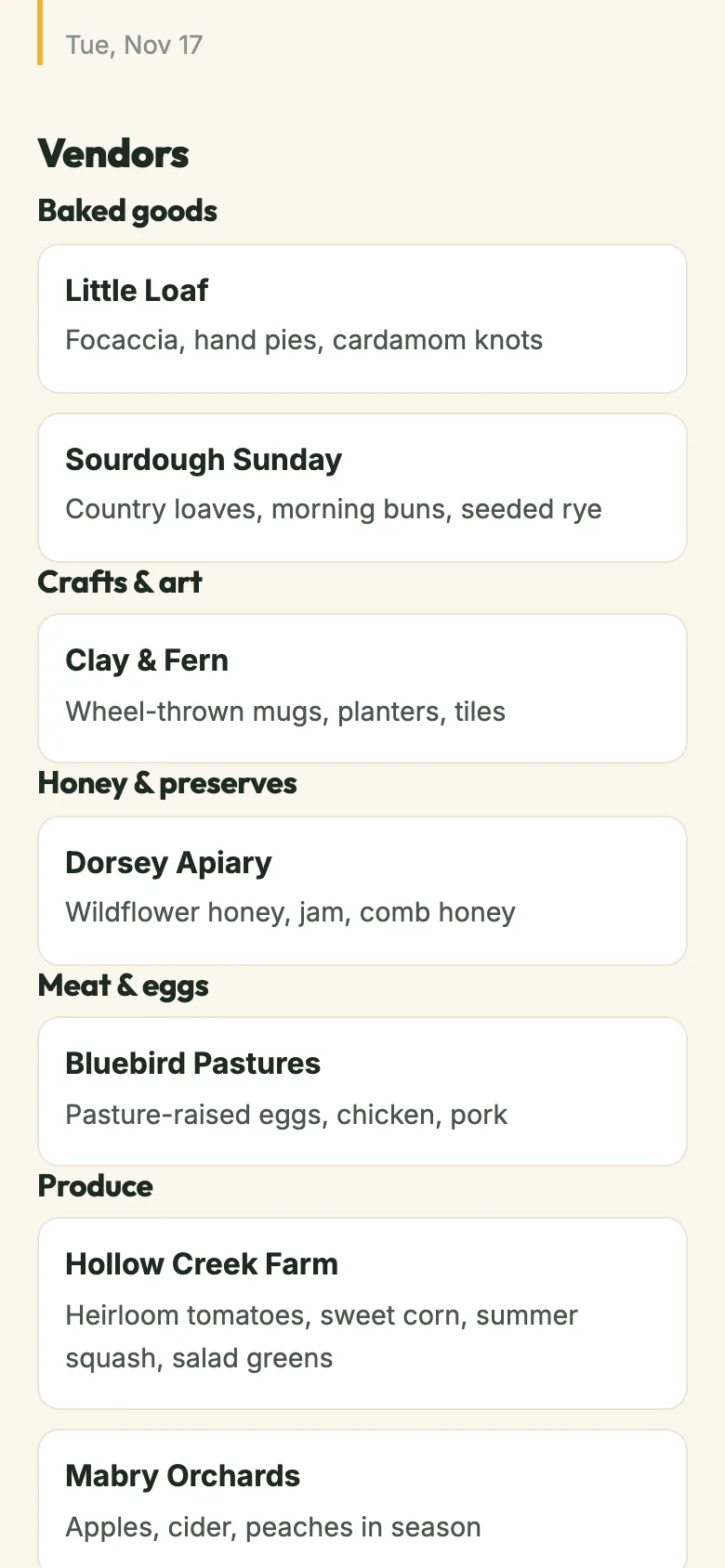
Vendor list. Who is selling, grouped by category.
Set it up once. Run it from your phone every market day.
Three steps, and the first one takes about a minute. Everything else in the product exists to make market morning quieter.
Name, kind of market, town, market day and hours. Add a booth fee as text if you charge one. Publish, and your page is live at marketpay.app/m/your-market.
Put the link on your flyer, your socials and your email signature. Vendors apply from the page. You approve, waitlist or decline from one queue, and they get a portal link.
Open today’s roster. Check vendors in, assign booths, tick paid, mark no-shows. Post an announcement if the weather turns. Reminders went out last night on their own.
Everything a market needs. Nothing a market has to pay for.
A public page Google can find
Name, next market day, hours, season, venue with a maps link, amenities, booth fee and your vendor list, at marketpay.app/m/your-market. Every upcoming date goes to Google as an event.
EVENT JSON-LD · STATE DIRECTORY · ADD TO CALENDARVendor applications
An Apply button on your page. Applications land in one queue with category, products, links and a note. Approve, waitlist or decline with a message; the vendor gets an email.
NEW / WAITLIST / DECLINED · DECISION EMAILS · CLOSE ANY TIMEBooth assignment
Generate booths in bulk (A1 to A40), group them by zone, give every vendor a default. Move anyone on the day from your phone.
BULK GENERATOR · ZONES · DEFAULT BOOTHSCheck-in and no-shows
The roster for today, grouped by zone. Tap a vendor to check them in, mark a no-show, tick the paid box. A count at the top tells you how the morning is going.
CHECKED-IN / EXPECTED · PAID TRACKING · UNDOAnnouncements to vendors
Load-in times, a parking change, a rain call. Write it once, pin it on your page, and email every approved vendor with one toggle.
PINNED ON PAGE · EMAIL APPROVED VENDORSDay-before reminders
The evening before each market day, vendors get an email with the hours and their booth. You get one with the roster counts. Turn either off in settings.
VENDOR + ORGANIZER · PER-MARKET TOGGLESVendor portal, no login
Every approved vendor gets a private link. It shows their status, their booth and upcoming dates with Confirm and Can’t make it buttons. No password, nothing to install.
PER-DATE RSVP · RESEND LINK ANY TIMECSV export
Every vendor and application, every status, in one file whenever you want it. Your data is yours, and you never have to ask us for it.
ONE CLICK · ALL STATUSESPick your kind of market.
Same tool, set up for the way each kind of market actually runs. Night markets and pop-ups fit too; pick the closest one.
- Farmers marketsA page Google can find, a vendor list that stays current, and a Saturday morning that runs itself.
- Craft fairsJuried applications, a floor plan of numbered booths, and a vendor list buyers can browse before the doors open.
- Flea marketsSpaces by row, a fee you can track per seller per day, and a page that tells the whole town you are open this Sunday.
- Food truck ralliesA lineup page for the crowd, a confirm-or-decline link for every truck, and no more guessing who is actually coming.
- Holiday marketsA short season, a long vendor list, and one page to point every flyer, post and email at.
- Browse marketsMarkets already on Marketpay, by state. Find one near you or see what a public page looks like.
Rules, templates and checklists.
What vendors can sell from a home kitchen in every state, plus printable templates for running a market.
- Cottage food laws by statePermits, sales caps, labels and seller's permits for selling homemade food in all 50 states and DC.
- How to start a farmers marketTen steps from a site and a day of the week to opening morning.
- Vendor application templateA free printable vendor application for farmers markets and craft fairs.
- How much to charge vendorsBooth fee models and a calculator that works out your break-even fee.
- Market rules templateFree printable rules and regulations for vendors. Edit and hand out.
- Craft fair vendor checklistEverything to pack for a craft fair or market, as a printable checklist.
- How much a vendor booth costsReal booth fees at farmers markets, craft fairs, state fairs and comic cons, plus booth sizes.
- Craft fair and vendor insurance costWhat vendor liability insurance costs per year and per event, and what shows ask for.
- Vendor break-even calculatorBooth fee, insurance and gas against your margin: how much you need to sell to come out ahead.
- Are craft shows worth it?How to judge a show before you pay the booth fee, and what to track after.
- How to have a successful vendor boothSetup, pricing, talking to shoppers and follow-up that turn a booth into repeat sales.
- Vendor booth ideas and displaysLayouts, displays, height, color and small touches that make a 10x10 booth stand out.
- Vendor booth lightingLighting a booth at night or at a craft show with no electricity.
- Vendor booth signs and bannersWhat your banner, price signs and payment signs should say, and what sizes work.
- Is selling baked goods profitable?Price cookies, bread and cakes from your real costs, with a per-item calculator.
- Selling baked goods on Facebook MarketplaceWhich states let you take orders online and deliver, state by state.
- Selling baked goods on EtsyWhy shipping homemade food across state lines is usually off-limits, and the exceptions.
- How to become a farmers market vendorPermits, insurance, applications and what market managers look for.
Because a market should not need a software budget.
Most markets are run by one or two people, a volunteer committee, or a nonprofit with more heart than money. Marketpay is built by Intuzu to be the tool those people deserve. There is no paid tier behind a feature you need, no per-organizer fee, and we do not sell or share your vendors’ information with anyone. It runs on infrastructure that costs almost nothing per market, so giving it away is just the math. Our commitments are written down on the promises page.
- No seats · No tiers · No trial clock
- No ads · No selling vendor data
- Export any time · Leave in one click
- A real support inbox
Questions people ask before they trust “free”.
Is it really free? What’s the catch?
Yes, all of it, for every market and every organizer. There is no paid tier, no trial that runs out, and no ads. Marketpay runs on serverless infrastructure that costs Intuzu very little per market, and we are fine carrying that. The only thing we want is more markets running on it.
Do I need an account?
No. Open the app and set up your market. When you want to sign in from another phone or add a co-organizer, attach your email and you get a code. No password to remember.
How do vendors apply?
Your public page has an Apply button. A vendor fills in their business name, category, what they sell and a note. It lands in your applications queue, they get a confirmation email with a portal link, and you approve, waitlist or decline with a message.
Do you handle booth fees?
Not yet. You write the fee as text on your page (for example "$35/day · $300/season") and tick a paid box on each vendor for each market day. Collect it however you do today. Payment processing may come later, and it will not change the price of Marketpay.
Can my co-organizers use it?
Yes. Invite them with a link. There is no seat count and no per-person charge, so invite the whole committee. Owners can remove people; everyone else can run the market.
Can I get my data out?
Any time, from the app: a CSV of every vendor and application. Your data is yours, and leaving is one click. We do not make you email anyone to leave.
Who makes Marketpay?
Intuzu, a small software company in the United States. Support is a real inbox: support@intuzu.com.

Run your market. Free.
No signup, no credit card, no sales call. Open it on your phone and set up your market in a minute.
Start free — no signup